I want to change the default drawing when I start IntelliCAD , please:
I want to remove the GRID's display but always I obtain it ON! How, please.
I made a new dwt file and named it "icad.dwt" but this don't run!
Big problem to change this start drawing!
===============
EDIT: I find it: You must create a icad.dwt file without the GRID here:
C:\Users\.........\AppData\Roaming\CMS\CMS IntelliCAD 10.0 Premium Edition x64\Templates
and not in CMS programm folder!
So now when you start IntelliCAD, you have your personal drawing and if you click the BLANK (NEW) icon in the menu, you obtain a personal new one.
Re: [RESOLVED] Remove the GRID=ON on start drawing!
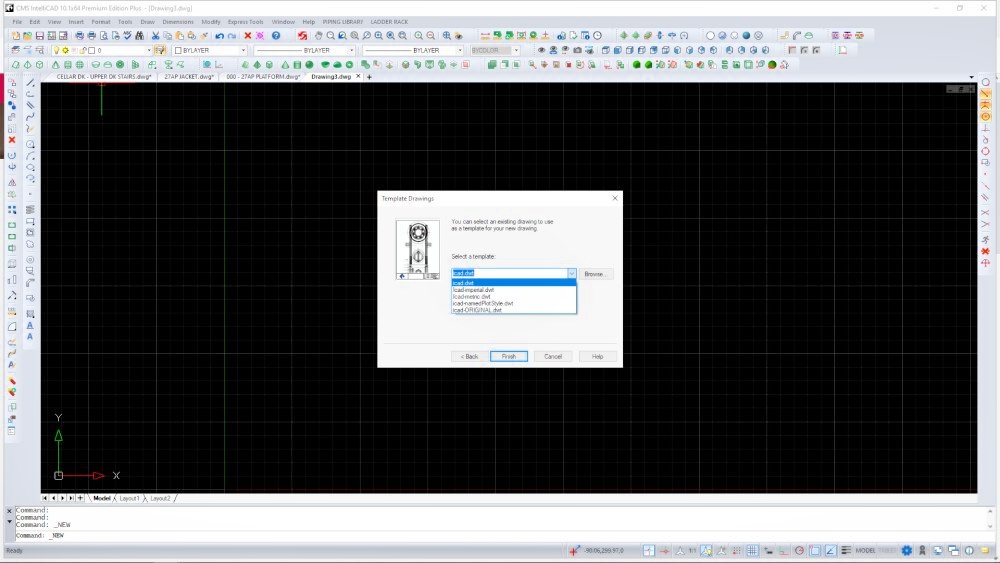
#2If you create new templates for projects, imperial/metric etc you can add them to the same folder and they will appear in the template drawing dialog (in the dropdown)
This way you can set dimension styles/text styles/layer convensions....... you just have to remember the setup in each template
 SteveN
This way you can set dimension styles/text styles/layer convensions....... you just have to remember the setup in each template
Re: [RESOLVED] Remove the GRID=ON on start drawing!
#3Hi sln8458,
I hadn't seen your reply... Thanks a lot for your tip. Indeed we can see all template in this dropdown, I forgotten....
Since 8 months I use IntelliCAD, I returned all the drawers and now it is much better. I am interested in the default settings to use it well.
I discover a big mistake in this v10 application. Some time when you make a viewport bigger than the paper space and you save the file and you re-open the file, the viewport can't to be select. I thought it was the layer wasn't activ but not! You can't select it.
I find a solution: I use the selection filter window and the entities type panel.
Other thing: I translated in french the day tip file now..... If there are french users here, I can send them!
I hadn't seen your reply... Thanks a lot for your tip. Indeed we can see all template in this dropdown, I forgotten....
Since 8 months I use IntelliCAD, I returned all the drawers and now it is much better. I am interested in the default settings to use it well.
I discover a big mistake in this v10 application. Some time when you make a viewport bigger than the paper space and you save the file and you re-open the file, the viewport can't to be select. I thought it was the layer wasn't activ but not! You can't select it.
I find a solution: I use the selection filter window and the entities type panel.
- capture_004.jpg (156.91 KiB) Viewed 2755 times
Other thing: I translated in french the day tip file now..... If there are french users here, I can send them!
