Page 1 of 1
How to move an entity to 0,0?
Posted: Sun Feb 14, 2021 11:43 pm
by rhgrafix
In Autocad I could move entities to 0,0 by just selecting the corner as basepoint (during move) and then typing 0,0, it was that simple. I cannot find a method in iCad other than 1st drawing a line from 0,0 to the corner of the entity, then snapping from/to those 2 points to move it to 0,0. How is this done? Thanks
Re: How to move an entity to 0,0?
Posted: Mon Feb 15, 2021 2:01 am
by sln8458
Try the Move command
Select object, press enter
Pick From point (base point), press enter
Select To point (enter 0,0 at command line)
press enter
Re: How to move an entity to 0,0?
Posted: Mon Feb 15, 2021 4:18 am
by QuanNguyen
Try another way:
- turn of system variable
DYNMODE , setting value = 0
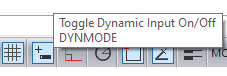
- dynmode.png (3.15 KiB) Viewed 4544 times
Re: How to move an entity to 0,0?
Posted: Mon Feb 15, 2021 9:01 pm
by rhgrafix
Thanks Quan, that works! Too bad I have to toggle off my dynmode for that to work but at least now I know a work-around.
Oops, sln's response also works.
QuanNguyen wrote: ↑Mon Feb 15, 2021 4:18 am
Try another way:
- turn of system variable
DYNMODE , setting value = 0
dynmode.png
Re: How to move an entity to 0,0?
Posted: Mon Feb 15, 2021 9:04 pm
by rhgrafix
That's how I was doing it, tried it again and now it works, bizarre, I literally did that 5 times before.
Thank you.
sln8458 wrote: ↑Mon Feb 15, 2021 2:01 am
Try the Move command
Select object, press enter
Pick From point (base point), press enter
Select To point (enter 0,0 at command line)
press enter