Page 1 of 2
Turning off advanced grips
Posted: Mon May 01, 2023 5:04 pm
by Zsolt007
Hi, Does anybody know how I can turn off the advanced/enhanced/extended/Idonotknow grips that appear on selected closed polylines e.g. rectangles?
Re: Turning off advanced grips
Posted: Tue May 02, 2023 2:00 am
by sln8458
Hi
If you open 'System Variable Manager' (under TOOLS)
type GRIP into the FILTER (top left corner)
select GRIPS
Determines the use of grips on selected entities.
Type: Integer
Saved: In the registry
Range: 0 (Grips don't display), 1 (Grips display), 2 (Enables additional midpoint grips on polyline segments)
Default: 2
Now you can set the grips how you prefer to work.
SteveN
Re: Turning off advanced grips
Posted: Tue May 02, 2023 2:32 am
by Zsolt007
Hi,
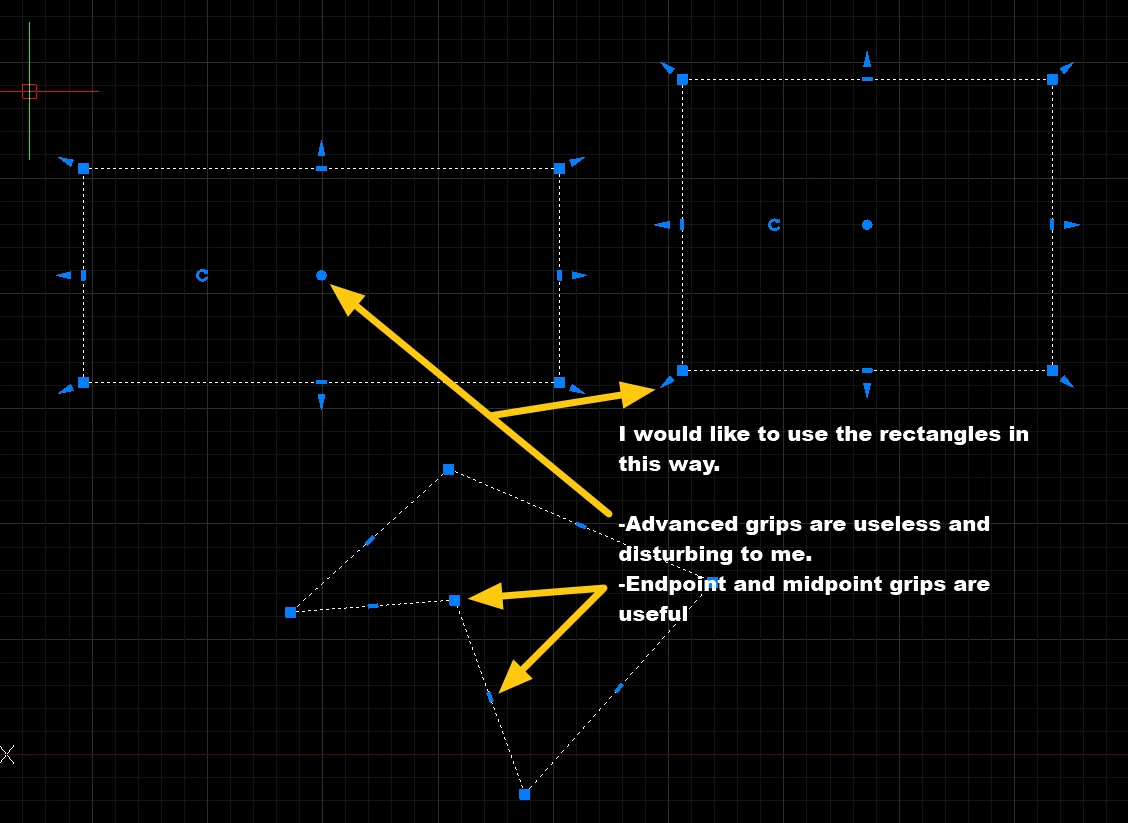
Thank you, but I would like to turn off only the advanced grips (you can rotate or move closed polylines with those). As the help says "These grips can be helpful for schematic drawings where precise scale or sizing is not required."
I only create precise engineering drawings, and those advanced grips are disturbing me during work, I never use them.
For example the advanced grips can be turned off with the GRIPBLOCK variable on blocks, but I cannot find a variable for closed polylines.
The variable you mentioned also turns off the midpoint grips of polylines not just the advanced grips, but the midpoint grips are very useful in some cases, so I do not want to turn them off.
So, briefly there are variables for blocks (GRIPBLOCK), for groups (GROUPDISPLAYMODE), but I need an option to turn off the advanced grips for closed polylines too.
Or why is not there an option to turn off all the advanced grips globally? This software is not Photoshop, I do not want to drag and drop objects, and I do not need "advanced" grips for this very rare purpose on the display, because they are just disturbing me.
Re: Turning off advanced grips
Posted: Tue May 02, 2023 2:46 am
by sln8458
have ypu tried setting the grips to 1?
Re: Turning off advanced grips
Posted: Tue May 02, 2023 3:18 am
by Zsolt007
Hi,
Yes, I did.
I quote myself:
"The variable you mentioned also turns off the midpoint grips of polylines not just the advanced grips, but the midpoint grips are very useful in some cases, so I do not want to turn them off."
Re: Turning off advanced grips
Posted: Tue May 02, 2023 6:01 am
by SPirou4D
Zsolt007 wrote: ↑Mon May 01, 2023 5:04 pm
on selected closed polylines e.g. rectangles?
BUT what polylines and rectangles please? I can't reproduce your problem !!!!!

- Capture_002.jpeg (24.72 KiB) Viewed 81784 times
Re: Turning off advanced grips
Posted: Tue May 02, 2023 7:00 am
by sln8458
Pat,
draw a RECTANGLE, it will then giveyou theextra grip the OP is referting to.
SteveN
Re: Turning off advanced grips
Posted: Tue May 02, 2023 7:19 am
by Zsolt007
Please see the video linked:
https://youtu.be/v8_sZlTjm6o
Re: Turning off advanced grips
Posted: Tue May 02, 2023 7:38 am
by Zsolt007
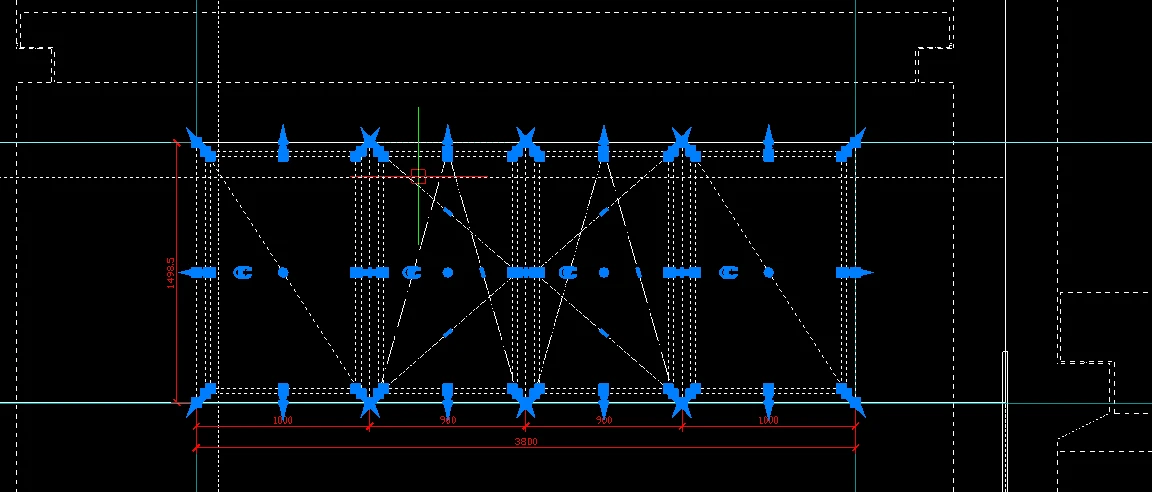
This is one of my drawings nowadays. I cannot see anything because of the advanced grips.
Re: Turning off advanced grips
Posted: Tue May 02, 2023 8:07 am
by QuanNguyen
Hi,
Here's the result as Steven suggests (GRIPS=1).

- Grips_1.png (16.08 KiB) Viewed 81770 times
Re: Turning off advanced grips
Posted: Tue May 02, 2023 8:19 am
by SPirou4D
sln8458 wrote: ↑Tue May 02, 2023 7:00 am
draw a RECTANGLE, it will then giveyou theextra grip the OP is referting to.
Ha yes the grips! I thought that the ellipse was an IntelliCAD's shape! Sorry.
ABSOLUTELY Steve are right!
Re: Turning off advanced grips
Posted: Tue May 02, 2023 8:24 am
by Zsolt007
SPirou4D wrote: ↑Tue May 02, 2023 8:19 am
Ha yes the grips! I thought that the ellipse was an IntelliCAD's shape! Sorry.
Ahh, sorry, it is my bad. That ellipse is just a highlight.
Re: Turning off advanced grips
Posted: Tue May 02, 2023 8:27 am
by Zsolt007
QuanNguyen wrote: ↑Tue May 02, 2023 8:07 am
Hi,
Here's the result as Steven suggests (GRIPS=1).
Grips_1.png
No, it is not. As I replied to Steven:
Zsolt007 wrote: ↑Tue May 02, 2023 3:18 am
Hi,
Yes, I did.
I quote myself:
"The variable you mentioned also turns off the midpoint grips of polylines not just the advanced grips, but the midpoint grips are very useful in some cases, so I do not want to turn them off."
Please see the comments above.
Re: Turning off advanced grips
Posted: Tue May 02, 2023 8:37 am
by Zsolt007
Re: Turning off advanced grips
Posted: Tue May 02, 2023 9:36 am
by SPirou4D
As you say you can't with IntelliCAD !
OR transform your rectangles to polylines

- Capture_003.jpeg (17.82 KiB) Viewed 81735 times
EDIT: Ha YES I saw what you explain, even orthogonal polylines show the center + the center of rotation !
My capture is not correct because this polyline is a litle fake and don't show these grips !
If the marks are annoying for reading the selection, you can change the size of the grips with the GRIPSIZE system variable
The default is 5 !
IntelliCAD can't! Desoled....