Page 1 of 2
New tool to IntelliCAD : Create Construct Entities
Posted: Tue Jul 01, 2025 10:19 am
by SPirou4D
I saw on Acad a function very usefull "Construction" or "Create Construct line"
On IntelliCAD we can place the objects (line, shape etc...) on the CLINE layer.
I try to create a macro but nothing.
I must use a lisp script to place an object to the CLINE layer (create the CLINE layer if not exist or place to this layer).
Someone has an idea.... please?
Or make an Icad command directly???
Re: How add a new function to IntelliCAD
Posted: Tue Jul 01, 2025 12:34 pm
by SPirou4D
Code: Select all
(defun c:CLC ( / ent LayerName)
	(princ "\nChoose the entities to serve as construction... ")
	(setq ent (ssget))
	(setq LayerName "CLINE")
	(if (not (tblsearch "layer" LayerName ));test of existence
	  (command "_layer" "_M" LayerName "_C" 4) ;if it does not exist it is created
	)
	;it exists, just in case, we unfreeze it, activate it and unlock it, then we make it current
	(command "_layer" "_T" LayerName "_U" LayerName "_ON" LayerName "_S" LayerName "")
	XXX
	(princ)
)
(princ "\n==> CLC")
(princ)
I win to code this and now I want place the entities (ent) on this layer but with what command where XXX is, please?
Like :
foreach(place the ent on this layer)
Re: How add a new function to IntelliCAD
Posted: Tue Jul 01, 2025 1:22 pm
by SPirou4D
Code: Select all
; CLC.lsp

; TRANSFORMER DES ENTITES EN LIGNE DE CONSTRUCTION

(defun c:CLC ( / ent sNomCalque)
	(princ "\nChoisissez les entites à mettre en construction... ")
	(setq ent (ssget))
	(setq sNomCalque "CLINE")
	(if (not (tblsearch "layer" sNomCalque));test de l'existence
	  (command "_LAYER" "_M" sNomCalque "_color" 4) ;si n'existe pas il est créé et devient courant
	)
	(progn
	(command "CHPROP" ent "" "_layer" "CLINE" "")
	)
	(princ)
)
(princ "\n==> CLC")
(princ)
I found this but don't work yet....An idea? I create and place the entities selection on the CLINE layer but the color of the CLINE layer is not Cyan....just ByLayer.
The command _M don't assign the color in same time of his Make...???
Re: How add a new function to IntelliCAD
Posted: Tue Jul 01, 2025 6:31 pm
by QuanNguyen
Hi Patrick,
Please add two "Enter keys" to the last command:
(command "_LAYER" "_M" sNomCalque "_color" 4 "" "" )
Re: How add a new function to IntelliCAD
Posted: Wed Jul 02, 2025 12:54 am
by SPirou4D
Ho thanks a lot Quan it's the solution !
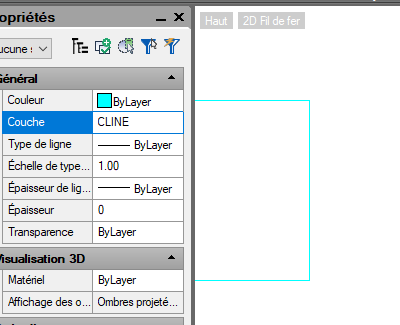
- image_2025-07-02_090041489.png (13.39 KiB) Viewed 13425 times
I have a little question: the layer CLINE stay activated, current. If I want return to the state before my script, how to make this please?
Re: How add a new function to IntelliCAD
Posted: Wed Jul 02, 2025 1:23 am
by QuanNguyen
No, the command doesn't change the active layer.
Please check again.
Code: Select all
(command "_LAYER" "_M" sNomCalque "_color" 4 "" "" )
Re: How add a new function to IntelliCAD
Posted: Wed Jul 02, 2025 1:55 am
by SPirou4D
Indeed I hadn't see that... Sorry. All is ok now!
Today I added a feature: the type of CLINE will be "DASHED2" as in ACAD.
I added because Quan's answers two buttons to DisplayAll/Hide these objects.
If someone want this tool:
https://1drv.ms/f/c/3e78343d1605325e/El ... A?e=IDp8XU
The Blue button is to create ConstructLines and eyes to DisplayAll/Hide the object in Block editor or default view.
I can explain how to add an Addons toolbar like this if needed :
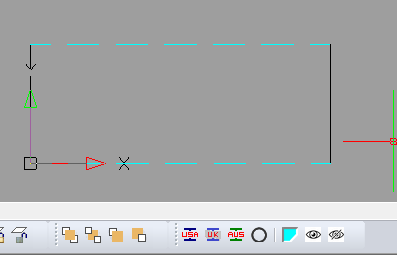
- 2025-07-03 12 20 18.png (6.3 KiB) Viewed 13397 times
Re: New tool to IntelliCAD : Create Construct Entities
Posted: Tue Jul 08, 2025 12:47 am
by UGMENTALCASE
Hi, there is a bunch of construction line commands in the draw menu
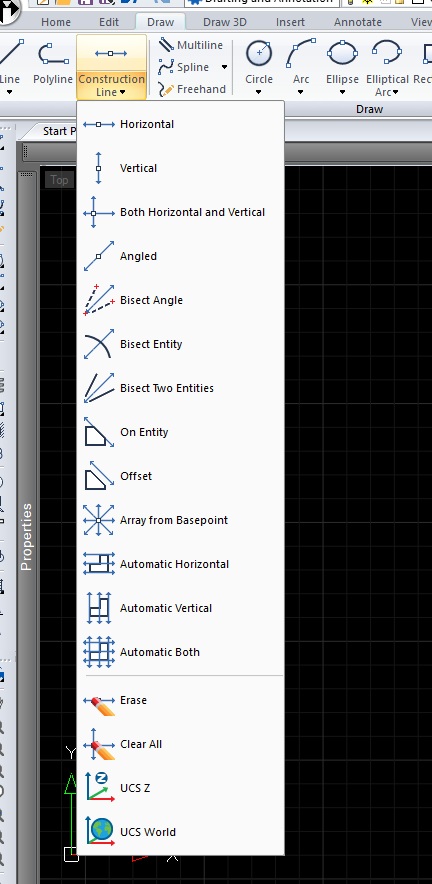
- Untitled.jpg (92.54 KiB) Viewed 13241 times
Re: New tool to IntelliCAD : Create Construct Entities
Posted: Tue Jul 08, 2025 3:20 am
by SPirou4D
UGMENTALCASE You don't understand my tread : I created a new command to IntelliCAD that exist in Autocad.
This addon is to trandform a line or multiline or circle or arc in construct line. not infinite line..
Add command that would control layer and color
Posted: Wed Feb 18, 2026 12:33 pm
by MARTIN L
Hi, i would like to choose a short cuts like (L6) that would select a layer called (FTE) and make it color 30
I tried to create macro and vba ...
My first time working on that kind of stuff
In my head it looks simple but it looks like it is not !!
I would like to know where to go and how to do it please !! ; )
Re: New tool to IntelliCAD : Create Construct Entities
Posted: Thu Feb 19, 2026 1:49 am
by sln8458
Hi,
It should be possible via a macro.
Why not post what you have and we can help you along the way.
Re: New tool to IntelliCAD : Create Construct Entities
Posted: Fri Feb 20, 2026 10:09 am
by MARTIN L
I Tryed trought Cui command
I asked chat gpt to give me a macro code and
I wrote that in command name
^C^C-LAYER;M;FTE;C;30;FTE;;
name is juste: L6_FTE
Don't know if its ok and if it is, what am I supposed to do after that ??
I use intellicad 14,1 PE
Is it how to create macro ??
if yess, aftwer that, how to use it ?
Re: New tool to IntelliCAD : Create Construct Entities
Posted: Fri Feb 20, 2026 7:58 pm
by QuanNguyen
Hi Martin,
For beginning with VBA, please refer to the document of IntelliCAD.
Goto Help -> Developer Help to display the document.
Re: New tool to IntelliCAD : Create Construct Entities
Posted: Sat Feb 21, 2026 6:33 am
by MARTIN L
Yes I already download vba
I was'nt sure if I needed to go throught vba or cui !!
I know I start from far but I learn fast ; )
i'm really interested to learn for me and help my collegues in my busieness !!
Re: New tool to IntelliCAD : Create Construct Entities
Posted: Sat Feb 21, 2026 7:09 am
by MARTIN L
Sub FTE ()
^C^C-LAYER;M;FTE;C;30;FTE;;
End Sub
This is the module that I created
From the code that chat gpt gave me
does'nt work