Page 1 of 1
How to change entity visibility with Intelli-lisp
Posted: Wed Jul 02, 2025 1:28 pm
by SPirou4D
I found this autolisp :
Code: Select all
;;(change visibility)
	(repeat (setq x (sslength ent))
		(setq obj (vlax-ename->vla-object (ssname ENT (setq x (- x 1) ))))
		(if  (= (vla-get-HasAttributes obj) :vlax-true)
		    (foreach att (vlax-invoke obj 'getattributes)
				(if (= tagname (strcase (vla-get-tagstring att)))
				  (progn
					 (vla-put-invisible att :vlax-false)
				  );;close progn
				);;close if
		    );;close foreach
		);;close if
	);;close repeat
but vla-get-HasAttributes don't exist with Icad !
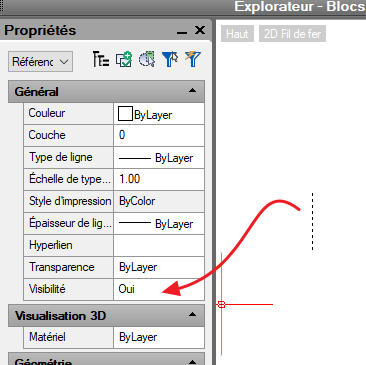
I want obtain this property :
- 2025-07-02 21 30 29.png (16.71 KiB) Viewed 7696 times
Re: How to change entity visibility with Intelli-lisp
Posted: Wed Jul 02, 2025 6:10 pm
by QuanNguyen
Hi Patrick,
We don't need to use Lisp for that; IntelliCAD supplies three commands to hide and view objects.
- HIDEOBJECTS
- ISOLATEOBJECTS
- UNISOLATEOBJECTS
Re: How to change entity visibility with Intelli-lisp
Posted: Thu Jul 03, 2025 1:11 am
by SPirou4D
Ha yes with only HIDEOBJECTS in terminal it's ok. Thks Quan I searched for a long time with Visibility/Visible but I didn't find it...
In my script i do like that so:
(command HIDEOBJECTS ent "" "")
BUT
Command: HIDEOBJECTS
This command is not allowed while the Block editing session is active.
HIDEOBJECTS + ISOLATEOBJECTS don't work in Block Editor mode ! Hoops !
I want hide the Construct Line I created If I want to use with block editor I can't... like Acad.
in this video at > 13.57 :
https://www.youtube.com/watch?v=OrF1tE3lvXE
I want use "Construct lines" and hide them and close my block so the block don't show these contruct lines !
Re: How to change entity visibility with Intelli-lisp
Posted: Thu Jul 03, 2025 2:28 am
by QuanNguyen
Try this routine, Patrick.
Code: Select all
(defun c:invis (/ ent i ss) ; InVisible
  (if (setq i -1 ss (ssget ))
    (while (setq ent (ssname ss (setq i (1+ i))))
      (vla-put-visible (vlax-ename->vla-object ent) :vlax-false )    ))
  (princ) )

(defun c:vis(/ ent i ss) ; Visible
  (if (setq i -1 ss (ssget "_A") )
    (while (setq ent (ssname ss (setq i (1+ i))))
      (vla-put-visible (vlax-ename->vla-object ent) :vlax-true ) ))
  (princ))
Re: How to change entity visibility with Intelli-lisp
Posted: Thu Jul 03, 2025 3:14 am
by SPirou4D
Yes Quand I will try it....At soon Thks for your nice help.
EDIT: Nickel/Chrome Quan! your prog work very good !
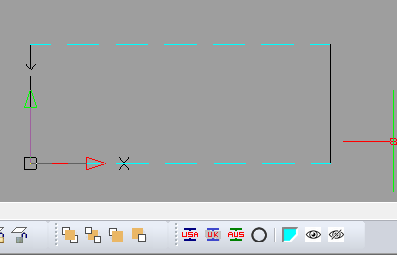
I added the two function in the same lisp file and added two buttons to hide/display objets
Here is the file now:
https://1drv.ms/u/c/3e78343d1605325e/ET ... g?e=u6PUio
- image_2025-07-03_122027053.png (5.61 KiB) Viewed 7675 times
Blue is to create ConstructLine and eyes are to DisplayAll/Hide !
Very goog tools now because you Quan !
Re: How to change entity visibility with Intelli-lisp
Posted: Thu Jul 03, 2025 6:29 pm
by QuanNguyen
Hi Patrick,
In the CLC routine, you might check if the linetype "DASHED2" exists. (TblSearch )
Re: How to change entity visibility with Intelli-lisp
Posted: Fri Jul 04, 2025 1:39 am
by SPirou4D
Ha yes you're right Quan I forgotten... I thought that "DASHED2" was by default in IntelliCAD....
(tblsearch table-name symbol [setnext])
At soon...
Re: How to change entity visibility with Intelli-lisp
Posted: Fri Jul 04, 2025 6:29 am
by SPirou4D
Quan I found that code :
Code: Select all
	(if (tblsearch "ltype" "DASHED2")   ;Vérifiez si le type de ligne DASHED2 est chargé
		(progn
			(command "CHPROP" ent "" "_layer" "CLINE" "_LT" "DASHED2" "")
		)
		(progn
			(command "-linetype" "L" "DASHED2" "Icad.lin" "")
			(command "-linetype" "L" "DASHED2" "Icadiso.lin" "")
			(command "CHPROP" ent "" "_layer" "CLINE" "_LT" "DASHED2" "")
		)
	)