Page 1 of 1
Since this day IntelliCAD v13 don't run !
Posted: Tue Dec 10, 2024 4:28 am
by SPirou4D
I don't have made change with IntelliCAD because I don't use it since a lot.
But since this day I can't start it !
I re-installed it but no change: can't start it.
I removed it with IOBIT application. restart my computer and make a cleaning with CCleaner and than re-installed IntelliCAD v13 with the last downloading.
BUT no change I can't start IntelliCAD !
What's the prob?
Re: Since this day IntelliCAD v13 don't run !
Posted: Tue Dec 10, 2024 4:36 am
by SPirou4D
SPirou4D wrote: ↑Tue Dec 10, 2024 4:28 am
What's the prob?
Ho I found the solution during I write you.... I removed the folder "CMS IntelliCAD Backup" stay in place and now IntelliCAD start !
I remembered this new folder in my documents and which had posed the problem the last time a few months ago....
Why this folder????? Backup save problem's files and prevents the restarting of IntelliCAD !
Very BAD idea !!!
Re: Since this day IntelliCAD v13 don't run !
Posted: Wed Dec 11, 2024 1:47 am
by sln8458
SPirou4D wrote: ↑Tue Dec 10, 2024 4:36 am
SPirou4D wrote: ↑Tue Dec 10, 2024 4:28 am
What's the prob?
Ho I found the solution during I write you.... I removed the folder "CMS IntelliCAD Backup" stay in place and now IntelliCAD start !
I remembered this new folder in my documents and which had posed the problem the last time a few months ago....
Why this folder????? Backup save problem's files and prevents the restarting of IntelliCAD !
Very BAD idea !!!
Morning Pat, hope you are well?
Can you confirm the full path for "CMS IntelliCAD Backup" pls
Is it : C:\Users\Username\AppData\Roaming\CMS\CMS IntelliCAD 13.0 Premium Edition Plus x64\Backup
SteveN
Re: Since this day IntelliCAD v13 don't run !
Posted: Wed Dec 11, 2024 10:21 am
by SPirou4D
Hi Steve,
This folder was in my Documents :
C:\Users\Patrick\Documents\CMS IntelliCAD13.0x64.backup
His name was with this extension : .backup
but in this folder : nothing !
C:\Users\Patrick\Documents\CMS IntelliCAD13.0x64\Emergency Saved Drawings
No bug !
I can't understand ! I removed this folder and ....
Now al is ok .
Re: Since this day IntelliCAD v13 don't run !
Posted: Wed Dec 11, 2024 2:55 pm
by IMAC E
Thanks Patrick and SteveN!
I think I'm having the same problem with IntelliCAD as of this morning. If I try to open the program I briefly see the logo pop up followed by "CMS IntelliCAD13 x64 has encountered a problem and needs to close".
I do have a "CMS IntelliCAD13.0x64" folder in my documents, but nothing that says "backup" on it. I'll see if I can track that folder down and delete it.
Re: Since this day IntelliCAD v13 don't run !
Posted: Thu Dec 12, 2024 2:47 am
by sln8458
Morning guys,
Here is what I have installed for 13.0.
This is the path C:\Users\username\Documents\CMS IntelliCAD13.0x64
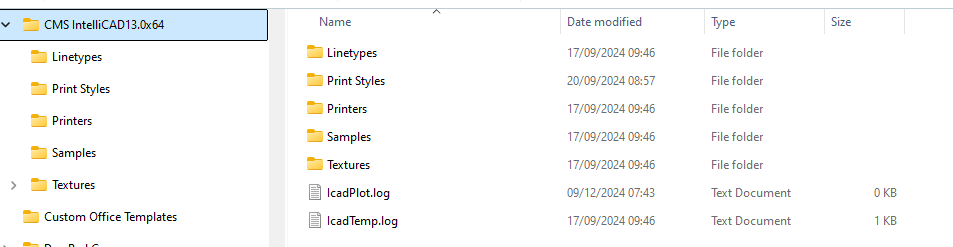
- no backup folder.png (25.02 KiB) Viewed 19142 times
ATM all is working OK
There is a backup folder:
Located here: C:\Users\Username\AppData\Roaming\CMS\CMS IntelliCAD 13.0 Premium Edition Plus x64

- with backup folder.png (16.67 KiB) Viewed 19142 times
SteveN
Re: Since this day IntelliCAD v13 don't run !
Posted: Thu Dec 12, 2024 9:23 am
by SPirou4D
There is a backup folder:
Located here: C:\Users\Patrick\AppData\Roaming\CMS\CMS IntelliCAD 13.0 Premium Edition Plus x64
Yes Steve I have the same with into :
Annual / Daily / Monthly / Weekly folders
But the backup folder I spoke was other thing.... may be it's me I created ?
Very strange !
Re: Since this day IntelliCAD v13 don't run !
Posted: Thu Dec 12, 2024 10:18 am
by IMAC E
Good morning!
Mine looks the same as yours Steve, but it still will not open.
Luckily I have a computer tower with an older version of IntelliCAD that still works. Hopefully I can find a fix soon. I have work to do!
Re: Since this day IntelliCAD v13 don't run !
Posted: Sat Dec 14, 2024 3:44 am
by SPirou4D
Today I wanted to thank the CMS team for their answer about this problem !
A small number of users have reported that the application crashes when they try to open it. This problem seems to be related to a specific version of the Microsoft Visual C++ 2015-22 redistributable library (x64). It seems that another program installed on your computer has replaced the correct version of this library with an older one, causing the CMS IntelliCAD 13 application to malfunction.
Users can manually install/repair VC redistributable from Microsoft website:
https://aka.ms/vs/17/release/vc_redist.x64.exe
Thanks a lot for your answer. I understand now because I installed a little application with it..... and corrected this Microsoft Visual C++ 2015-22 with your link to download it.
Now all is ok!
Best regards.
Patrick Depoix
Re: Since this day IntelliCAD v13 don't run !
Posted: Sat Dec 14, 2024 10:59 am
by sln8458
Hi Pat,
Glad you have a solution

Steve
Re: Since this day IntelliCAD v13 don't run !
Posted: Mon Dec 16, 2024 8:36 am
by IMAC E
Merci beaucoup Patrick! You're a life saver!
Re: Since this day IntelliCAD v13 don't run !
Posted: Fri Jan 02, 2026 10:13 am
by Paul Sweet
I just encountered the same problem this morning. I can't restart ICAD 11.
I checked my Backup folders and all they had was Default.CUI. I deleted the one from the Daily file and left the others since they had an older date.
I reinstalled the Visual C++ file as recommended.
I still can't restart ICAD 11. Since I can't restart it, I can't deactivate it, and I'm afraid I won't be able to reinstall it without purchasing a new license. The license transfer process is very unforgiving.